Walkthrough Context My Role Research Journey Map Principles Evolution Decisions Before & After Prototype Impact Reflections
All Projects
Q
QuickBooks Capital

Internal Underwriting Tool for Financial Reviews

A 0→1 product replacing a brittle Excel workflow with a purpose-built review tool — reducing decision time and giving QuickBooks Capital a data foundation for auto-decisioning.

Role
Product Designer — end-to-end ownership from research through final design
Scope
0→1 internal tool, UX research, design system, prototyping
Outcome
Shipped iBOSS underwriting tool to production, 50% faster reviews
Product Design 0→1 Creation Internal Tooling UX Research Design Systems
~50%
Review time cut in pilot
1,000+→90
Data points reduced
17→1
Tabs consolidated
0→100%
Audit trail coverage
iBOSS Underwriting Tool — laptop mockup

2 minute overview of the final product and key interactions

STEP 01

Dashboard overview

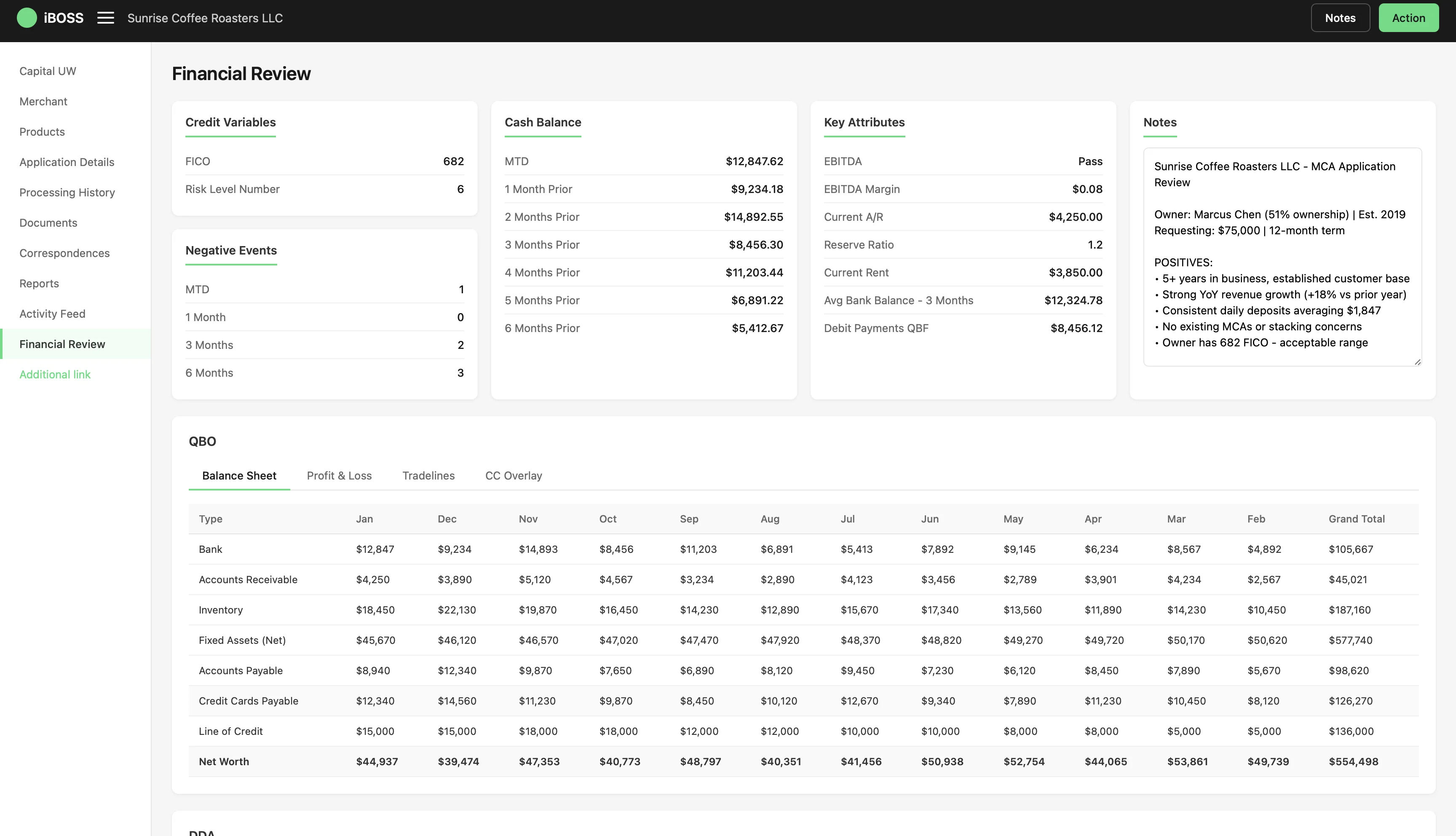
All critical data points — FICO, cash balance, EBITDA, negative events, and analyst notes — visible on a single screen. The 10-second gut check that used to take 15 minutes across 17 tabs.

Dashboard overview
STEP 02

Balance Sheet

12 months of QBO-connected financial data — bank balances, receivables, inventory, payables, and net worth — auto-populated and sortable without manual data entry.

Balance Sheet
STEP 03

Profit & Loss

Auto-generated P&L with expandable line items. Revenue, COGS, operating expenses, and EBITDA flow down to summary margin cards at the bottom.

Profit & Loss
STEP 04

Tradelines

Full credit picture at a glance — 8 tradelines, utilization bars, payment status badges, and 12-month payment history heatmaps for instant pattern recognition.

Tradelines
STEP 05

CC Overlay

Credit card transactions cross-referenced against QBO records to catch discrepancies and verify spending patterns match reported income.

CC Overlay
STEP 06

DDA Bank Statements

Transactions grouped by payee — Square deposits, Stripe transfers, supplier payments, payroll — with monthly breakdowns across the full review period.

DDA Bank Statements
STEP 07

Month-to-Date View

Current month summary with total credits, debits, net change, and transaction count. Each transaction auto-tagged and compared to prior month trends.

Month-to-Date View
STEP 08

Transaction Tagging

Revenue, Expense, and Fee tags color-coded for rapid scanning. Adjust toggles let underwriters include or exclude transactions from the final health calculation.

Transaction Tagging
STEP 09

Final Health

DDA-derived data vs QBO data side by side — gross revenue, adjustments, net totals, and monthly averages. The source of truth for the lending decision.

Final Health
STEP 10

Change Log

Full audit trail — who excluded a transaction, when, why, and the exact dollar impact. 4 adjustments, -$7,250 net impact, all traceable for compliance.

Change Log
1 / 10

Interactive walkthrough of the full financial review flow

QuickBooks lending doubled, but the team couldn't keep up

Lending grew 2x compared to pre-pandemic levels in FY22, but 60%+ of loan applications still required manual review. The underwriting team was working overtime — including weekends and holidays — just to stay within their 2-day SLA. With originations expected to double again, the bottleneck was about to become a wall.

The average time for an underwriter to pick up an application ranged between 2–8 days. Time to Decision for manually reviewed apps averaged 8.9 days. Customers were waiting too long and submitting documents repeatedly.

8.9 days
Average Time to Decision for manual reviews
2–8 days
Time for underwriter to pick up an application
60%+
Applications requiring manual underwriter review
2-day
SLA target the team was consistently missing

End-to-end UX design, from discovery through hi-fi prototypes

I was the sole designer embedded on this initiative, partnering with a PM, engineering lead, and cross-functional stakeholders across underwriting, policy, and compliance.

Led
End-to-end UX design from discovery through final hi-fi prototypes and user testing
Facilitated card sorting exercise reducing 1,000+ data points to <100
Created design principles aligning underwriting, policy, and compliance
Drove decision to build purpose-built tool vs. patching Excel
Ran 3 prototyping sessions with underwriters to validate interaction patterns
Contributed
Partnered with PM on product vision and roadmap priorities
Collaborated with engineering on technical feasibility and data architecture
Worked with compliance and policy teams on regulatory constraints
Supported stakeholder alignment through journey mapping workshops

A month inside the underwriting workflow

Our team spent a month deep-diving into the underwriter experience. We performed follow-me-home interviews, reviewed existing process documentation, and mapped the end-to-end underwriting journey. We identified the Financial Review — where analysts manually review 12 months of bank transaction data — as the most manual, time-consuming, and high-impact area to improve.

Follow-me-home interview
"I only look at maybe 6 of those 17 tabs. The rest are legacy fields nobody uses anymore."
Most data points in the Checklist were inherited from previous tool versions — underwriters had developed workarounds to skip irrelevant sections entirely.
Process observation
"When something looks off, I open a separate calculator and re-do the math myself."
Trust in auto-calculated fields was low. Underwriters double-checked formulas manually because Excel errors had caused incorrect decisions in the past.
Stakeholder discussion — Compliance
"If we get audited, there's no way to trace why an underwriter excluded a transaction."
Zero audit trail for manual adjustments. Compliance had flagged this as a risk repeatedly, but the Excel workflow had no mechanism to capture decision rationale.
Card sorting exercise
"These five things tell me 80% of what I need to know in the first 30 seconds."
Underwriters had a clear mental model for triaging applications — but the tool forced a linear path through all data instead of surfacing high-signal fields first.

~30% of all applications require an underwriter to review 12 months of bank data. This process takes anywhere from a few minutes to an hour. The average: 20 minutes per review.

The existing tool was an Excel spreadsheet the team called "the Checklist" — over 1,000 data points across 17 tabs. Through 4 stakeholder discussions, a card sorting exercise, and 3 prototyping sessions with underwriting, policy, and compliance, we distilled those 1,000+ data points down to fewer than 100.

The original Excel underwriting checklist — over 1,000 data points across 17 tabs

Card sorting exercise

We gave 6 underwriters a deck of 94 cards — each representing a data point from the existing Checklist — and asked them to group them by how they actually use them during a review. The clusters that emerged directly shaped the tool's information architecture.

6
Participants
94
Cards sorted
6
Groups emerged
Quick Health Check
6/6
  • FICO score
  • Risk level number
  • Cash balance (MTD + trends)
  • EBITDA pass/fail
  • Negative events (MTD, 3mo, 6mo)
Became → Dashboard
Financial Statements
6/6
  • Balance sheet (monthly)
  • Revenue, COGS, OpEx
  • Gross profit & net income
  • EBITDA breakdown
Became → QBO: Balance Sheet + P&L
Bank Transactions
5/6
  • Transaction-level debits & credits
  • Payee groupings
  • Revenue vs. expense tagging
  • Monthly net change
Became → DDA Overlay + MTD
Credit Profile
5/6
  • Open tradelines & balances
  • Utilization rates
  • Payment history (12 months)
  • Delinquencies
Became → QBO: Tradelines
Payment Processing
4/6
  • Processor connections (Square, Stripe, Clover)
  • 6-month volume
  • Transaction counts
  • Avg transaction size
Became → QBO: CC Overlay
Adjustments & Audit
4/6
  • Excluded transactions
  • Manual additions
  • Re-categorizations
  • Final health summary
Became → Adjustments

Mapping the underwriter's financial review

We mapped every step of the manual review process — from opening the application to submitting the decision — to identify pain points, redundant steps, and opportunities to surface the right data at the right time.

Interactive prototype — scroll and zoom to explore the full journey map

Four guardrails for every decision

Before jumping into design, we established principles to guide priorities and tradeoffs throughout the project.

Smooth
Inspire confidence by easing friction and preventing avoidable errors.
Directional
Show what's needed, where it's needed, when it's needed.
Energizing
Design a fresh and elegant experience that motivates action.
Focused
Reduce noise and make frequently-used data points more prominent.

How underwriter feedback reshaped the layout

The first concept presented all transaction data in a flat table — mirroring the Excel mental model. After testing with three underwriters, we learned they scan by category first, not chronologically. V2 introduced collapsible expense groups with summary cards, which matched their actual workflow.

V1 — Flat Transaction Table Didn't test well
APP-20847
Dashboard Transactions P&L
Search transactions...
All months ▾
DateDescriptionAmountCategoryFlag
01/03/24ADP Payroll$(6,800)Payroll
01/05/24Stripe Transfer$12,450Revenue
01/07/24WeWork Office Rent$(3,200)Rent
01/08/24Amazon Web Services$(940)OpEx
01/10/24Client Invoice #1048$8,200Revenue
01/12/24Comcast Business$(189)Utilities
01/14/24Gusto Benefits$(2,100)Payroll
01/15/24Square POS Deposit$3,670Revenue
248 more rows ↓
What we heard
"I can't scan this — I need to see payroll separate from rent separate from one-offs. Right now it's just a wall of rows and I'm scrolling forever."
V2 — Categorized Groups Shipped
$24,320
Gross Profit
$18,740
EBITDA
32.4%
Avg Margin
Revenue $24,320 12 txns
Stripe Transfer$12,450
Client Invoice #1048$8,200
Square POS Deposit$3,670
Operating Expenses $(4,329) 8 txns
Payroll $(8,900) 4 txns
COGS $(2,150) 3 txns
Why it worked
Summary cards gave underwriters a quick read on Gross Profit, EBITDA, and margins up top. Collapsible groups let them drill into Revenue or Payroll and skip the rest — matching how they actually triaged applications.

How each piece of the tool earned its place

01 / 06

Dashboard — the 10-second gut check

Before diving into transaction data, underwriters need a quick signal: is this applicant generally healthy or are there red flags? The dashboard surfaces FICO, risk level, cash balance trends, EBITDA pass/fail, and negative events — all above the fold. If something looks off, they know exactly where to investigate next.

Credit Variables Cash Balance Key Attributes Negative Events
UI screenshot
02 / 06

DDA drill-down — payee groups that open up

In Excel, analysts had to build pivot tables and conditional formatting to investigate bank data. Here, transactions are automatically grouped by payee. Click to expand and see every individual transaction underneath. Sortable columns and search make it easy to find specific activity across months of statements.

Expandable Rows Sortable Columns Search
UI screenshot
03 / 06

Transaction tagging — categorize, toggle, adjust

In the old workflow, underwriters manually created formulas and highlighted cells to adjust calculations. Now every transaction has a category tag, an include/exclude toggle, and automatic recalculation. Missing a transaction? Add it through the modal. Every adjustment is logged.

Revenue Expense Transfer
UI screenshot
04 / 06

P&L statement — auto-generated, expandable

Revenue, COGS, operating expenses, and other expenses roll up into Gross Profit, EBITDA, and Net Income rows. Expandable sections let analysts drill into line items like payroll, rent, and marketing. Summary cards below give a quick read on averages and margins.

Gross Profit EBITDA Net Income
UI screenshot
05 / 06

Tradelines — credit health at a glance

Utilization bars with color gradients make it immediately obvious which accounts are over-leveraged. Payment history heatmaps show 12 months of on-time vs. late payments. Type badges (Credit Card, LOC, Auto, Term) help analysts quickly scan the credit landscape.

Utilization Bars Payment History High Utilization Flags
UI screenshot
06 / 06

Change log — the audit trail that was missing

Previously, underwriting decisions and adjustments lived in individual Excel files with no audit trail. Now every exclusion, addition, and re-categorization is captured with who, what, when, why, and the net impact on calculations. This was a key compliance requirement and also enables the data modeling that powers future auto-decisioning.

Reason Capture Impact Tracking Exportable
UI screenshot

Excel Checklist vs. iBOSS

Before — Excel
Excel checklist spreadsheet
  • 17 tabs and 1,000+ data points
  • Pivot tables and conditional formatting to investigate bank data
  • Horizontal scrolling required
  • Manual formulas to adjust calculations
  • Box folder per customer for file management
  • Download/upload cycle for every review
  • Siloed data — learnings stay in each spreadsheet
After — iBOSS
iBOSS dashboard
  • 1 page with <100 critical data points
  • Drill-down within the same experience
  • No horizontal scrolling
  • One-click exclusions with auto-recalculation
  • No file management required
  • Data is always available and persisted
  • Connected data — all learnings centrally stored

Explore the tool yourself

This is a working prototype of the iBOSS financial review tool — populated with sample data. Scroll through tabs, expand transaction groups, and see how the audit trail captures every adjustment.

Interactive prototype — click through tabs and expand sections to explore

What this unlocked

The team was averaging 8.9 days to decision, missing a 2-day SLA, and working weekends to keep up. Here's what changed after iBOSS rolled out to the pilot group.

20→10 min
Average review time cut in half during pilot
1,000+→90
Data points distilled through card sorting
17→1
Excel tabs replaced by single-page experience
0→100%
Audit trail coverage for compliance
Short-Term Impact
Cut review time by roughly half in pilot — streamlined workflows and auto-calculation replaced manual data entry
Eliminated Excel file management entirely — no more version control issues, broken formulas, or lost work
Faster underwriter onboarding — purpose-built tool replaced tribal knowledge needed to navigate a complex spreadsheet
Long-Term Impact
Auto-decision rates increase as the system captures structured underwriter decisions for ML training
Financial review time decreases further as models learn from human judgments and handle routine cases
Foundation for underwriting acceleration at scale — turning the bottleneck into a self-improving system

What I'd do differently

01
Test earlier with lower-fidelity prototypes
I spent significant time on hi-fi prototypes before validating core interaction patterns. Paper prototypes or wireframe click-throughs for the tab structure and drill-down patterns would have surfaced usability issues faster — particularly around the DDA transaction tagging flow, which required two iterations to get right.
02
Quantify the training cost of the old workflow
New underwriters needed weeks of shadowing to learn the Excel Checklist's idiosyncrasies. I wish I had measured onboarding time pre- and post-iBOSS — that metric would have strengthened the business case for the tool beyond throughput alone.
03
Push harder for direct user analytics
The pilot validated throughput improvement, but I didn't have fine-grained analytics on which tabs underwriters spent the most time in, or which features they used vs. ignored. Instrumenting the tool from day one would have given clearer signal for V2 prioritization.